A website calculator is a form that accepts a customer’s parameters and returns a figure: cost, delivery time, chargeable weight, or profit per unit. Building such a form with AI really is fast. But fast does not mean “ask and receive.”
Let’s look at a real-world example. These are the calculators of “International Forwarder” — four tools for calculating shipping costs, customs payments, volumetric weight, and the unit economics of goods from China.

What these four calculators calculate
The first calculates shipping. Route, cargo type, weight, volume, and transport method; the output is a price range and delivery time for each available option.
The second calculates customs payments based on the product’s value and shipment characteristics. This is a preliminary estimate, not the work of a customs declarant, and the interface says so explicitly.
The third calculates volumetric weight for LCL and FCL. It compares actual weight with volume and shows which of the two figures will be used in the calculation. It answers the question customers ask most often: why does 850 kg cost as much as 1050?
The fourth calculates the unit economics of goods from China for marketplaces: purchasing, logistics, payments, selling price, and profit per unit.
The logic for all four is kept in one JavaScript file, while the rates are stored in one config. This is more important than it sounds, and I’ll return to it later.
What can safely be handed over to a model
Form markup. Describe the fields, value types, and units of measurement, and the model will assemble the route, weight, volume, and transport-method blocks. The shipping calculator has seventeen such fields: writing them by hand is tedious and unnecessary.
The result card. Price range, delivery time, comparison of methods, a short conclusion, field tips, and error messages — standard markup according to standard rules.
Repetitive handlers: calculate values, run the calculation, update the result, save the state, and assemble the parameters for an inquiry. Four calculators mean four nearly identical sets. Here, the model saves a full day of work.
And translating a ready-made formula into code. Not “invent a formula,” but “here is the rule; transfer it into JavaScript.” The difference is fundamental: in the first case, the model makes the business decision; in the second, a person does.

What must not be handed over
The numbers.
A model invents rates confidently and plausibly. The price per kilogram, threshold, coefficient, and delivery time all look like a neat commercial calculation and cannot be checked by eye. A ten-percent error will come back to you with a customer who arrived carrying a printout.
That is why rates never pass through the model at all. They are stored in a separate config, and next to each figure is a note explaining where it came from and when it was verified. Here, the medians were taken from the price lists and calculators of 23 competitors, and the verification date is shown directly on the page next to the exchange rate.
The second rule is one config for everything. The service page, price showcase, and calculator all read the same value. While the figure was stored in three places, it drifted in all three: the service promised one thing, the showcase displayed another, and the form calculated using a third.
Which models to use
A cheap model — roughly at the level of gpt-5.6-terra, costing about 0,07 dollars per million tokens — handles the bulk of the work. Forms, markup, repetitive handlers, and tips: that is enough for it.
Formulas, thresholds, rounding, and branching by cargo type should be run through a stronger model: sol costs around 0,25 dollars, while astra costs around 0,50. It is 3,5 and 7 times more expensive, but it also has far less work to do.
The entire generation of the four calculators cost a matter of cents.
But an expensive model does not eliminate testing. It is good at catching errors in conditions or in the order in which coefficients are applied, while the calculation’s consistency still has to be checked against real numbers.
Why the calculation runs in the browser
The rates are sent to the page once as JSON, and JavaScript does the rest of the calculating. The customer changes the weight, and the figure changes immediately without a server request.
This creates a requirement for the config. A rate must have a clear name, a unit of measurement, and a source, while the formula must use exactly the unit in which the value was verified. A per-kilogram rate silently calculated as a per-ton rate is the cheapest error in terms of effort and the most expensive in terms of consequences in this kind of code.
The script version equals the rate-update date. Change the figures, and all visitors get the new calculation without any discussions about clearing the cache.
The calculation can be shared via a link
The form state is written into the page address and localStorage. Anyone who opens the link sees not an empty calculator, but the same route, weight, volume, and transport method selected by the sender.
This changes the nature of the conversation. The manager and the customer are looking at the same configuration instead of reconstructing it from memory in a chat.
localStorage handles another scenario: leave the page and return an hour later — the fields are still there. For a seventeen-field form, that is no small thing.
One caveat: the state from the link must be validated on loading. An unfamiliar or outdated link can easily bring in an empty parameter or a cargo type that is no longer present in the config.
Calculation parameters are sent with the inquiry
The manager receives not “I’m interested in shipping,” but a line like: “Truck, China — Moscow; 850 kg / 4,20 m³ (1050 kg chargeable); 283 500 – 368 550 RUB; delivery time 15–25 days; cheapest: Sea LCL, fastest: Air.”
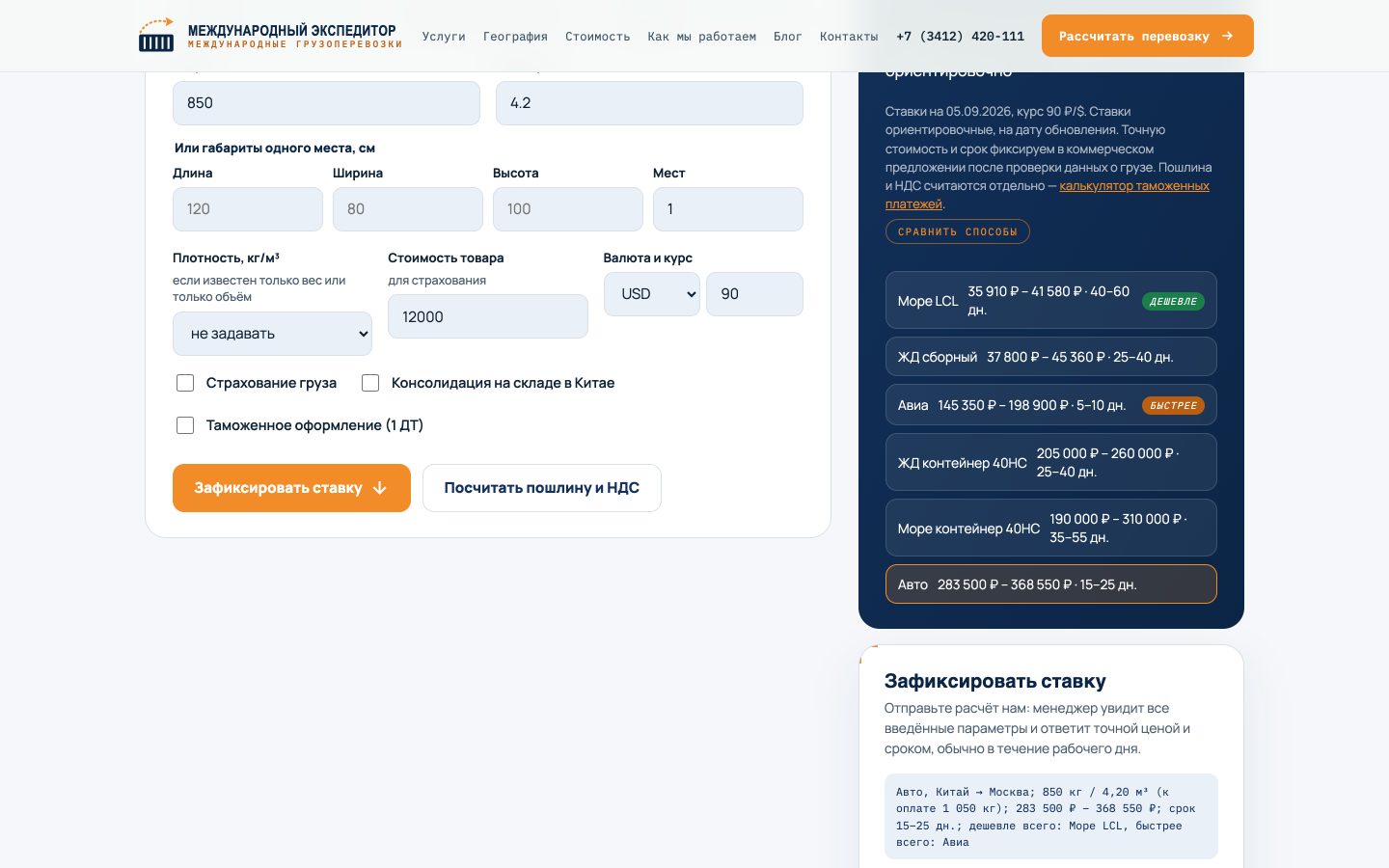
The first contact does not start from zero. The route, weight, volume, chargeable weight, price range, and what matters more to the customer — money or speed — are all visible.
There is only one condition. The name of the transport method must appear in the inquiry using the same wording the person saw. If you add a new option to the form, check that it does not turn into a system code on its way to the CRM.
What broke on this project
The arithmetic was correct. The text fell apart.
In the result summary, the line was assembled from parts: “Shipping ” plus the method, plus the route, plus a colon. Someone who arrived via a link with incomplete parameters saw: “Shipping , : 850 kg / 4,20 m³”.
A model writes such concatenations as ordinary text and does not check empty values. So testing had to be done manually: loading without parameters, a truncated link, an unknown value, zero volume, and recalculating after clearing the form.
And separately — thresholds. The same cargo is run with a value below the threshold, at the threshold itself, and immediately after it. Conditions like to trigger one unit early.
What this means for SEO
A calculator addresses queries that an article handles poorly: “volumetric weight,” “customs payment calculation,” and “shipping calculator.” An article explains the principle. A form accepts data and returns a personalized answer.

Three effects follow. People stay longer because they are doing something rather than reading. There is a reason to share a link to their calculation — an article does not offer that. And the inquiry arrives with parameters, meaning search interest turns into a request visible in the CRM.
What a calculator does not do is improve rankings on its own. It does not replace landing pages for commercial queries and does not eliminate work on text, links, and the technical side.
A standalone form unrelated to service pages brings almost nothing. What works is a chain: the service page leads to the calculation, the calculation explains the next step, and the step ends with an inquiry containing parameters.
Frequently asked questions
Can I ask AI to write the entire calculator?
Most of the implementation — yes: the form, handlers, result card, and tips. Rates, regulations, and verified rules — no. They are kept in a separate config with a source and verification date, while formulas are checked against known examples.
Why run the calculation in the browser rather than on the server?
The rates arrive on the page once as JSON, and JavaScript does the rest. Changing a field does not require a request, so the figure updates instantly.
How much does this kind of development cost in tokens?
Four calculators cost a matter of cents. The savings come from dividing the work: a cheap model writes the bulk code, while an expensive one checks the formulas and thresholds.
Will a calculator improve rankings?
Not on its own. It answers practical queries, keeps people engaged through interaction, gives them a reason to link to it, and brings in inquiries with parameters. Rankings appear when it is integrated into the site structure rather than living on a standalone page.
Compare models before you start
The service sets its plans, limits and model catalog. If they differ from this article, contact us so we can update it and record a new review date.
Browse modelsAffiliate link: your price stays the same and the project earns a commission.